





Flux.1 Kontext Max Image Generation, Powered by Wondercraft
Flux.1 Kontext Max is a professional-grade AI image generation and editing model built for storytelling, brand campaigns, and long-form creative projects.It processes extended text inputs — scripts, scenes, or full stories — to produce coherent, multi-image narratives with consistent characters, environments, and lighting.
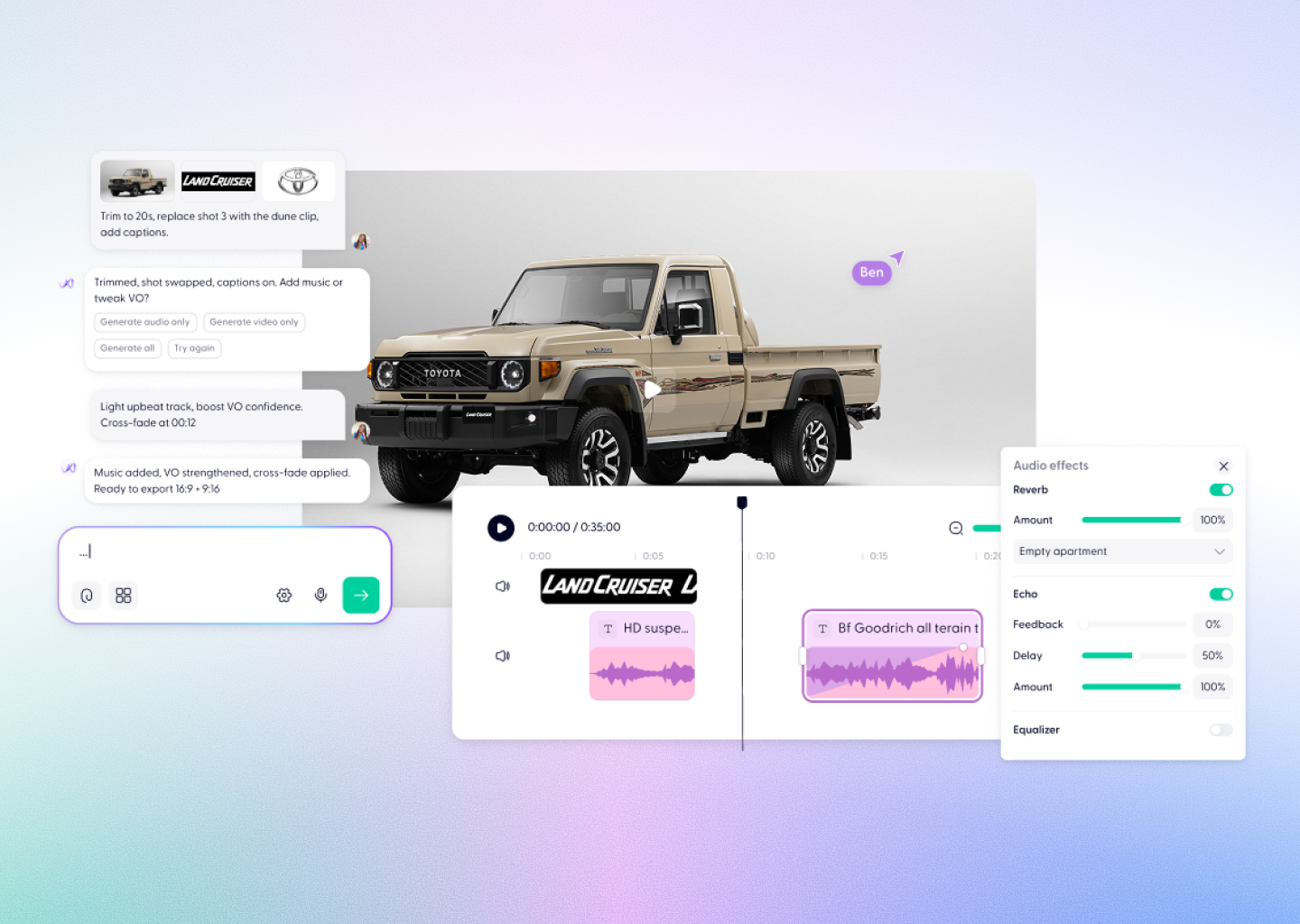
Now available inside Wondercraft Studio, Flux.1 Kontext Max becomes part of a complete multimedia workflow — where visuals, sound, and story come together seamlessly.
Now available inside Wondercraft Studio, Flux.1 Kontext Max becomes part of a complete multimedia workflow — where visuals, sound, and story come together seamlessly.
Try it in Wondercraft


Flux.1 Kontext Max
Flux.1 Kontext Max goes beyond prompt-to-image generation — it understands story structure, retains context, and preserves identity across every frame.
Extended Context Generation
Input entire scripts or long descriptions — the model extracts narrative logic and produces consistent, multi-scene imagery.
Character Memory
Automatically remembers faces, outfits, and expressions across different shots for visual continuity and storytelling cohesion.
Scene Logic & Shot Planning
Understands transitions, relationships, and pacing — perfect for comics, films, and interactive narratives.
Unified Style Control
Lock your preferred visual style across an entire set of images for branding, animation, or design workflows.
Precise Text & Object Editing
Edit words, logos, or objects within a scene using natural language — no manual masking or retouching needed.
Multi-Image Batching
Generate complete visual sequences from a single text block, enabling efficient storyboard and content planning.
Wondercraft Visual Workflows
Wondercraft transforms Flux.1 Kontext Max into a complete story production pipeline, connecting image generation with editing, voice, and motion.

From Script to Storyboard
Feed in full scripts or scenes. Kontext Max generates shot-by-shot visuals, and Wondercraft turns them into narrative sequences.

Voice and Sound Integration
Add narration, character dialogue, and ambient soundtracks synced perfectly to your generated visuals.

Timeline Editing
Arrange your generated scenes on Wondercraft’s video timeline. Add pacing, transitions, and sound in one intuitive editor.

Consistent Brand Visuals
Bind a visual style or character look across campaigns and reuse it in audio ads, training videos, or storytelling content.

Collaborative Editing
Invite teammates to review or refine scene generations, maintaining full creative control and consistency.

Flux.1 Kontext Max Alone vs in Wondercraft
Feature
Flux.1 Kontext Max Alone
 Flux.1 Kontext Max in Wondercraft
Capabilities
Workflow
Control
Ideal for
Long-form multi-image editing
Image generation and scene mapping
Text and style-based guidance
Visual designers, art directors
Full multimedia storytelling with audio and timeline
End-to-end production from script to release
Visual, audio, and Wonda-assisted co-direction
Storytellers, educators, and production teams
Flux.1 Kontext Max Alone
Long-form multi-image editing
Image generation and scene mapping
Text and style-based guidance
Visual designers, art directors
Flux.1 Kontext Max in Wondercraft
Full multimedia storytelling with audio and timeline
End-to-end production from script to release
Visual, audio, and Wonda-assisted co-direction
Storytellers, educators, and production teams

Why Wondercraft?
From scripts to stories.
Flux.1 Kontext Max builds the visuals; Wondercraft adds sound, pacing, and narrative direction.
All models, one ecosystem.
Work seamlessly with Kontext Max, GPT-Image-1, Nano Banana, Sora 2 Pro, and Veo 3.1 — all inside one creative studio.
True production flow.
Generate visuals, add AI voices, refine edits, and publish — without leaving Wondercraft.
Powered by Wonda.
Wondercraft’s built-in assistant helps structure your story, match tone, and guide creative direction across models.
How it works
FAQs
Everything you need to know about Flux Kontext Max
What is Flux.1 Kontext Max?

It’s a context-aware image generation model that can process long-form scripts or descriptions to create consistent, multi-scene visuals.
Is Flux.1 Kontext Max available in Wondercraft?
Yes — it’s integrated directly into Wondercraft Studio for image generation, editing, and storytelling.
What makes Flux.1 Kontext Max unique?
Its ability to maintain continuity across characters, lighting, and environments while understanding story logic and structure.
Can I use it for comics, ads, or films?
Absolutely. It’s ideal for storyboards, marketing visuals, and creative concept art that require consistent tone and design.
Does it support style control?
Yes — you can lock and transfer specific visual styles across scenes or entire projects.
Can I add audio or narration to my Kontext visuals?
Yes. In Wondercraft, you can layer professional AI voices, sound effects, and background music onto your generated images or storyboards.
Context-Aware. Consistency-Driven. Story-Ready.
From multi-scene storytelling to cinematic storyboards, Flux.1 Kontext Max in Wondercraft Studio gives you the power to create deeply coherent, emotionally rich stories — from script to screen.
Try it in Wondercraft